Help the people who matter stay part of everyday life.
KinDock is a secure, family-centred communication platform for supported living. Share home updates, private personal moments, calendars, photos, and virtual visits with the right people, without relying on scattered texts, email chains, or social media.
- Private by design
- Permission-based
- Proudly Canadian
Made for real relationships
The people at the centre, and everyone who loves them.
Friends, family, and the support team in one calm place, each seeing exactly what they should.



The problem
Family connection shouldn't depend on scattered messages.
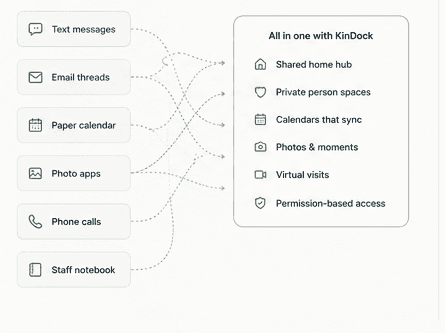
Updates arrive by text one week and not at all the next. Calendars live in three places. Photos get shared in ways no one is quite comfortable with.
And the hardest part: keeping each person's information private while still sharing the life of the home is nearly impossible with everyday tools. Families end up in the dark unless they keep asking, and staff repeat the same news across calls and shifts.
Share everyday life
The whole home, in the loop.
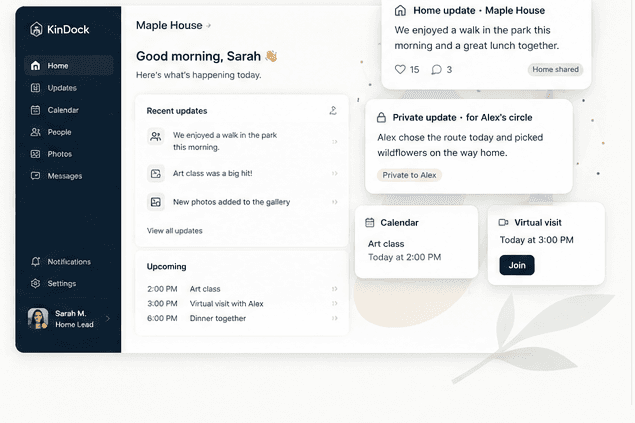
House news, activities, menus, photos, and meaningful moments, shared with everyone connected to the home. Families get a real feel for the place their person lives, not just occasional bulletins.

Keep each person's circle connected
A private space for every person.
Each person supported has their own space, visible only to their approved family connections and assigned support team. Updates land with the people who love them, and families can respond, so connection goes both ways.
Communicate with confidence
Always know who will see it.
Every update, photo, and event carries a clear audience, shown in plain language before anything is shared. Consent controls and an uneditable audit history sit underneath, so trust is built in, not bolted on.
A look inside
One trusted place, for everyone involved.
Explore the pieces that make it work. Families, support teams, and organizations each see a clear, role-appropriate view.
Pat Lead
Home sharedCommunity BBQ this Saturday. Families are warmly welcome.
♥ 15 · 4 responses
Sam Support
Home sharedNew raised garden planters arrive Friday. Planting party next week.
♥ 9 · 2 responses
Riya Support
Home sharedMenu for the week is posted on the kitchen board.
♥ 4 · 2 responses
The life of the home, in one feed
Explore featuresHouse news, activities, menus, and photos, shared with everyone connected to the home. Families get a real window into the place their person lives.
Pat Lead
Home sharedCommunity BBQ this Saturday. Families are warmly welcome.
♥ 15 · 4 responses
Sam Support
Home sharedNew raised garden planters arrive Friday. Planting party next week.
♥ 9 · 2 responses
Riya Support
Home sharedMenu for the week is posted on the kitchen board.
♥ 4 · 2 responses
The privacy model
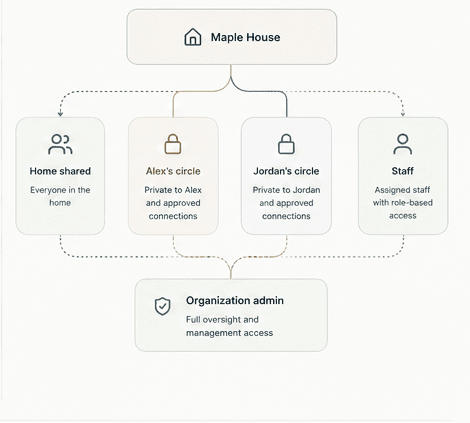
One home does not mean one audience.
Home news reaches everyone connected to the home. A person's private updates reach only their circle. Those boundaries are enforced in the database, on every request, not just hidden in the interface.
- Relationship-specific family access, never the whole home
- Support-team access based on active assignments
- Organization oversight without browsing private content
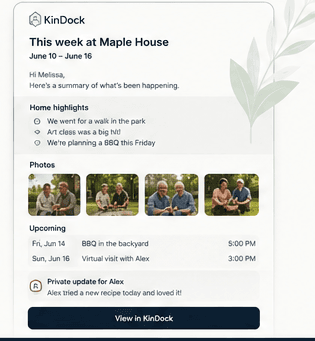
The Home Digest
Keep the home updated. Let KinDock keep families informed.
One calm weekly email: house news for everyone, upcoming events, new photos, and an “Updates for…” section covering each recipient's own people and no one else's.
Choose the delivery day, review before sending if you like, and let consistency do the quiet work of keeping families close.
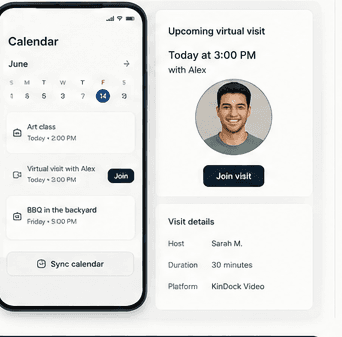
Calendars & visits
Visits people can count on.
Home activities on the shared calendar, personal visits on each person's own. Families subscribe securely from their own calendar app, and virtual visits come with a reminder and one clear Join button.
- Secure, revocable calendar subscriptions
- Shared home events and private personal events
- Virtual visits with approved contacts only

Who it's for
Built for supported living, however yours is shaped.
One home, every circle intact
Group living homes and small residential providers, sharing one household while protecting each person's privacy.
- A shared hub for house news, and a private space for every person
- Group photos that respect each person's consent
- A weekly digest that keeps every family informed
- Simple enough to run without an administrator
Pricing
Plans that grow with you.
Transparent pricing, a 30-day free trial, and no per-family fees. Invite the whole circle.
KinDock Personal
Best for one person and their support circle, or a family-governed arrangement.
$19/month
or $209 per year
- One private person space
- Approved family connections
- Photos, calendar & virtual visits
KinDock Home
Best for one residential home: a shared hub plus a private space for every person.
$34/month
or $374 per year
- Everything in Personal
- Shared home hub & Home Digest
- Support-team assignments, consent & audit
Organizations
Running several homes? Volume pricing brings the effective cost down to about $15 per location for larger organizations, with one billing account and central administration.
Trust is the product.
Role-based access
People see only what their role and relationships permit.
Secure invitations
Expiring invitations, never open-ended sign-up links.
Revocable calendar feeds
Subscriptions can be regenerated or revoked at any time.
Canadian-hosted data
The database runs in Canada, in the Central Canada region.
Questions, answered.
Privacy & access
Can a family connection see other people in the home?
No. Living in the same home does not mean sharing one audience. A family connection sees only the person they're approved for and the home-wide news, never another person's private updates, and never the home's full list of people supported.
How does access work for staff who support only some people?
Support-team access is based on explicit assignments. A staff member sees a person's private space only when they're actively assigned to that person, and relief or temporary cover can be given an automatic end date.
Is our data kept in Canada?
Yes. KinDock's database is hosted in Canada (Central Canada region). Our Security & Privacy page lists our subprocessors and where each part of the service runs.
Does KinDock replace our care records or case-management system?
No. KinDock is a communication and family-connection platform, not a clinical record, electronic health record, medication system, or case-management platform. It's designed for connection, not documentation.
Everyday use
How is KinDock different from a group chat or social media?
KinDock is built specifically for supported living. It keeps home-wide news separate from each person's private updates, shows exactly who can see every post before it's shared, and gives organizations permissions, consent controls, and audit history that a group chat can't.
Does every person supported need their own sign-in?
No. A sign-in is optional and configurable per person: independent, supported, shared-device, or none at all. Not having a login never reduces a person's voice in what is shared about them.
Can families respond to updates?
Yes, where a home enables it. A family connection can reply to an update they can see, and their response stays inside that update's audience. Direct messaging is planned as an early follow-up.
Give families a trusted way to stay part of everyday life.
Explore the live demo in two clicks, or start a 30-day free trial. No credit card, no sales call, cancel anytime.